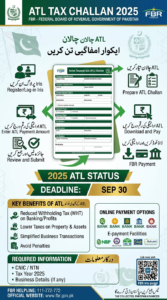
How to Create ATL Challan 2025 (Complete Guide for Pakistan)
Missing the tax return deadline can feel stressful—but fixing your Active Taxpayer status in 2025 is much easier than most people think. If your name isn’t on the Active Taxpayers List (ATL), you can restore it by paying a small surcharge through the system of the Federal Board of Revenue.
This guide walks you through the entire process of creating an ATL challan in a simple, practical way. Whether you’re a freelancer, salaried person, or business owner, you’ll be able to follow along without confusion.
What is an ATL Challan?
An ATL challan is a payment slip you generate online to pay a surcharge for late filing of your income tax return. Once you pay this surcharge and submit your return, your name becomes eligible to appear again on the Active Taxpayers List.
Think of it as a quick way to get back into the “active filer” category. Without it, you may continue facing higher taxes on everyday financial transactions.
Why Being on ATL Matters in 2025
Before jumping into the steps, it’s important to understand why ATL status is such a big deal in Pakistan.
If you are an active taxpayer:
- You pay lower withholding taxes
- You face fewer deductions on banking transactions
- You avoid extra charges on vehicle registration and property dealings
On the other hand, non-filers often end up paying significantly more in taxes. So, creating your ATL challan is not just a formality—it can save you money almost immediately.
Who Needs to Create an ATL Challan?
You should generate an ATL challan if:
- You missed the deadline for filing your income tax return
- Your name has been removed from ATL
- You want to switch from non-filer to active filer status
Even if you plan to file your return now, the surcharge payment is required to restore your ATL position.
ATL Surcharge Amount for 2025
For most taxpayers, the surcharge is quite affordable:
- Individuals: PKR 1,000
- Companies: PKR 10,000
These amounts are set by the FBR and may change slightly, but they’ve remained consistent in recent years.
Step-by-Step: How to Create ATL Challan 2025
Let’s go through the process step by step so you can complete it without mistakes.
Step 1: Log in to the IRIS Portal
Start by accessing the official IRIS portal of the FBR.
Enter your:
- CNIC (for individuals) or NTN (for businesses)
- Password
If you haven’t registered yet, you’ll need to create an account first. The registration process only takes a few minutes.
Step 2: Open the e-Payments Section
Once logged in, look at the main dashboard.
- Click on “e-Payments”
- Then select “Create Payment”
This is where you’ll generate your ATL challan.
Step 3: Enter Payment Details Carefully
This step is important because even a small mistake can cause delays.
Fill in the following:
- Tax Type: Income Tax
- Nature of Payment: ATL Surcharge
- Tax Year: 2025 (or relevant year)
- Amount: According to your category
Take your time here. Double-check everything before moving forward.
Step 4: Generate Your PSID
After entering the details, click on “Generate PSID.”
The PSID (Payment Slip ID) is a unique number linked to your challan. You’ll use this number to make the payment.
Make sure to:
- Save it
- Take a screenshot
- Or write it down somewhere safe
Step 5: Pay the Challan
Now that you have your PSID, you can pay your ATL challan using multiple methods:
- Mobile banking apps
- Internet banking
- ATM machines
- Bank branches
Just enter your PSID when prompted and complete the payment.
Step 6: Wait for ATL Status Update
After payment, your status doesn’t update instantly—but it doesn’t take long either.
- Usually updates within a few hours
- Sometimes may take up to 24–48 hours
Once processed, your name will appear in the ATL again (after filing your return if not already done).
Important Tip: Filing Return is Mandatory
One common misunderstanding is that paying the ATL challan alone is enough.
It’s not.
You must also:
- File your income tax return
- Submit it successfully
Without filing, your ATL status won’t be fully restored—even if you’ve paid the surcharge.
Common Mistakes to Avoid
Many people face issues due to small but avoidable errors. Here are the most common ones:
- Selecting the wrong tax year
- Entering incorrect CNIC or NTN
- Choosing the wrong payment type
- Paying the challan but forgetting to file the return
- Not saving the PSID
Avoiding these mistakes can save you time and frustration.
Pro Tips for a Smooth Process
If you want everything to go smoothly, keep these tips in mind:
- Always double-check your details before generating PSID
- Try to complete payment immediately after generating the challan
- Keep proof of payment محفوظ (safe)
- Use reliable internet to avoid session errors
- Log out and log back in if the portal seems slow
How Long Does It Take to Become Active Again?
In most cases:
- Payment confirmation: Immediate
- ATL update: Within 1–2 days
- Full active status: After return filing + payment
If it takes longer, you can check your status online or contact FBR support.
Benefits of Restoring Your ATL Status
Once your name is back on ATL, you’ll notice the difference right away:
- Lower tax rates on transactions
- Easier banking and financial processing
- No extra deductions on property purchases
- Better compliance record
For freelancers and business owners, this is especially important for maintaining smooth financial operations.